.png)
State Exam

(If on Desktop: Call/Text 407-383-0805)
Click by Click Instructions
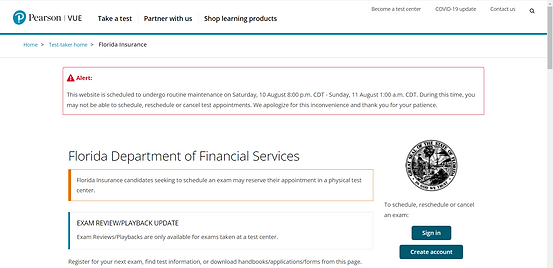
1. Click this link:
Link: https://home.pearsonvue.com/fl/insurance
2. Click "CREATE AN ACCOUNT"
Check YES to all disclosures.
3. Create your WEB ACCOUNT
Answer all questions honestly and based on your personal information.
4. Once your in "View Exams" and select the 2-15 Exam
InsFL-LHA05 FLA Health and Life and Annuity (incl. Var. Contracts) Agent (0215)
5. Fill in your info about schooling (No wrong answers)
6. Confirm Exam Selection (Click Go Next Button)
7. Click Agree to Terms
8. FIND A TEST CENTER
Type in your home address and find a testing center near you. Availability is LIMITED, you may have to select a location farther away in order to schedule a time that's available.
9. Book and Pay for the test ($44)
10. Good Luck! 😎
Feedback Matters


